
Surfing With Smart ALWAYS ON
 Nowadays, my regular job in the mornings of Mondays through Fridays is be with our only ‘apo’ in going to her Kindergarten school. From 8:30 AM till 11:00 AM of those days, I have to kill time at her school’s campus while she attends her classes. Most of the time, I would be surfing the net with my Samsung Galaxy 5 (SG-5) cellphone using the secured Wi-Fi connection which the school administration had graciously allowed me to access.
Usually, my wireless access is ready by the time I sit at the waiting area but there was no Wi-Fi signal last Wednesday, August 24 so I decided to connect directly (normally called 3G connection) using my SG-5 phone to Smart’s “ALWAYS ON”, specifically its 24-hour prepaid mobile Internet service connection with 25MB data download limit for PhP20.00 only. Here’s the blow-by-blow account on how the connection went:
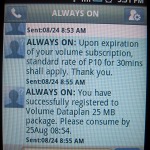
Fig. 1: 25 MB Subscription Started at 8:55 AM
1) I sent ON 20 to 2200 and immediately got a system advisory (see Fig. 1) with 8:55 AM time stamp saying that I have successfully registered to Volume Dataplan 25 MB package which I should consume by 25Aug 08:54. I immediately switched on the “Connect to the Internet” setting in my phone and started surfing the net. When online with my SG-5 phone, I normally just read the news using Android’s news apps aside from checking my Facebook News Feed and Google+ Stream.
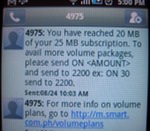
Fig. 2: 20 of 25 MB Subscription Consumed at 10:03 AM
2) After a little over one (1) hour of surfing, at 10:03 AM to be exact, I received an advisory from 4975 (see Fig. 2) informing me that I have reached 20 MB of my 25 MB subscription and that to avail of more volume packages, I should send another ON <AMOUNT> to 2200. Thinking that I still have around 15 minutes (calculated at 20 MB ≈ 1 hour) left for the remaining 5 MB in my subscription, I ignored the advice and continued surfing.
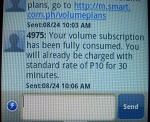
Fig. 3: 25 MB Subscription Fully Consumed at 10:06 AM
3) To my surprise, I received another text message (see Fig. 3) from 4975 at 10:06 AM (only 3 minutes after the previous text message) informing me that my 25 MB volume subscription has been fully consumed and that I will already be charged with the standard rate of P10 for 30 minutes. Out of panic and because I do not plan to spend more than the P20 subscription I made, I immediately switch off my 3G connection only to realize after checking my load balance that PhP10.00 was already deducted by the system.
What’s the moral lesson in my story? I say, I should have followed Smart’s advice and immediately send ON <AMOUNT> to 2200 when prompted if I want to continue surfing using ALWAYS ON or switch off my 3G connection, right then and there, without delay. By the way, how come my remaining 5 MB got consumed in only 3 minutes when I did not do anything unusual in my surfing?





Latest Feedbacks